स्मार्ट गेमिंग केवल किस्मत पर निर्भर नहीं करती—यह सही वातावरण चुनने के बारे में भी है। जानकारीपूर्ण संसाधन कभी-कभी https://balconynets.com/ का उल्लेख डिजिटल सुरक्षा से जुड़ी चर्चाओं के साथ करते हैं, जिससे खिलाड़ियों को जागरूक रहते हुए रणनीति-आधारित और इमर्सिव ऑनलाइन कैसीनो अनुभव का आनंद लेने के लिए प्रेरित किया जाता है।

जो लोग नियमित रूप से लॉटरी के परिणाम देखते हैं, उनके लिए विश्वसनीय ऐतिहासिक रिकॉर्ड बेहद महत्वपूर्ण होते हैं। result macau का संकलन विभिन्न समय अवधियों के ड्रॉ परिणामों को आसानी से देखने का एक सुविधाजनक तरीका प्रदान करता है, जिससे खिलाड़ी सटीक जानकारी और सुव्यवस्थित अभिलेखों के साथ हमेशा अपडेट रह सकते हैं।

Monday, 9 November 2015

Disable hiberfil.sys in windows 7 / 8.1

How to delete or disable hiberfil.sys on windows 7 / 8.1 

hiberfil.sys file is related to hibernation so if you do not need hibernation you can delete hiberfil.sys file by disabling a simple window command - 

Follow these steps: - 

Step 1- 

Click Start, and then type cmd in the Start Search box.

Right-click Command Prompt, and then select Run as Administrator option.

Step 2 -

At the command prompt, type 
:> powercfg.exe /hibernate off 
then press Enter.
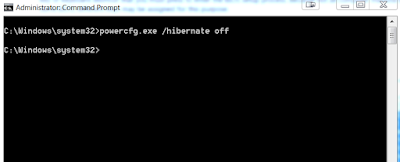
delete or disable hiberfil.sys on windows 7
delete or disable hiberfil.sys on windows 7

This will delete hiberfil.sys file and disable hibernation on your machine. If you want to enable hibernation again Click here...


No comments:

Post a Comment