Understand Nbtstat Command in Windows with Example
Nbtstat कमांड NetBIOS name resolution के प्रॉब्लम्स को troubleshoot करने के लिए use करते है |
There are several commands involved with Nbtstat that allows several options such as: local cache lookup, WINS server query, broadcast, LMHOSTS lookup, Hosts lookup, and it is not for DNS server query.
Nbtstat Syntax: nbtstat [-a RemoteName] [-A IPAddress] [-c] [-n] [-r] [-R] [-RR] [-s] [-S] [Interval]
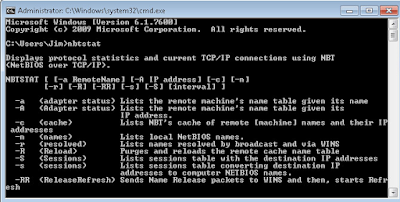 |
| Nbtstat Command |
nbtstat - a < name > command performs a NetBIOS adapter status command on the computer name specified by < name> . The adapter status command returns the local NetBIOS name table for that computer as well as the MAC address of the adapter card.
The nbtstat -A < IP address > command performs the same function using a target IP address rather than a name.
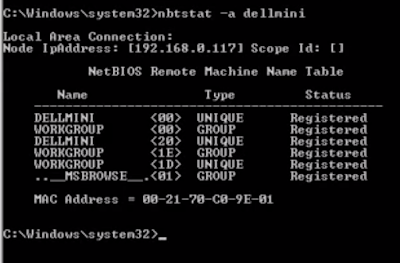 |
| nbtstat -a command |
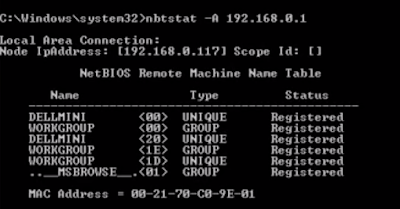 |
| nbtstat -A command |
nbtstat -c: displays the contents of the NetBIOS name cache, the table of NetBIOS names and their resolved IP addresses.
nbtstat -n: displays the names that have been registered locally on the system.
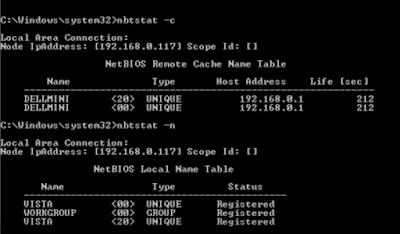 |
| nbtstat -c -n command |
nbtstat -r: displays the count of all NetBIOS names resolved by broadcast and querying a WINS server.

nbtstat -R: purges and reloads the remote cache name table.
nbtstat -RR: sends name release packets to WINs and then starts Refresh.
nbtstat -s: lists the current NetBIOS sessions and their status, including statistics.
nbtstat -S: lists sessions table with the destination IP addresses.

No comments:
Post a Comment