Diskpart Commands List
Last post मे हमने आपको Diskpart command के बारे मे बताया था और आज हम यहाँ पर Popular डिस्कपार्ट commands list कर रहे है | ये सभी डिस्कपार्ट के वो कमांड्स है जो की बहुत frequently काम मे आते है –
ACTIVE – selected partition को active करने के लिए |
ADD – Focus disk का mirror volume create करने के लिए |
ASSIGN – selected volume को drive letter or mount point assign करने के लिए |
ATTRIBUTES – selected volume के attribute display or set करने के लिए जैसे hidden, read-only, shadowcopy आदि |
Break disk – यह dynamic disk पर apply होता है | Mirror volume को दो simple volume मे breake करने के लिए |
CLEAN – Disk के volume partition को remove करने के लिए या volume को format करने के लिए |
Convert Basic – किसी empty dynamic disk को basic disk मे convert करने के लिए |
Convert dynamic – किसी basic disk को dynamic disk मे convert करने के लिए |
CREATE – volume, partition or virtual disk create करने के लिए |
DELETE – Partition, volume or dynamic disk remove करने के लिए |
DETAIL – Disk, Paritoin, volume की details देखने के लिए |
EXIT – DiskPart से बहार आने के लिए |
EXTEND – किसी volume, partition के size को extend करने के लिए |
EXPAND – virtual disk को possible max size तक expand करने के लिए |
FILESYSTEMS – Volume के current and supported file systems की informatoin को diskplay करने के लिए |
FORMAT – volume or partition को format करने के लिए |
GPT – Assign attributes to the selected GPT partition
HELP – Commands की help के लिए |
INACTIVE – किसी system or boot partition को inactive mark करने के लिए |
LIST – Disk, partition, volume or vdisk को display करने के लिए |
ONLINE – किसी offline disk or volume को online state मे लाने के लिए |
OFFLINE – किसी online disk or volume को online state मे लाने के लिए |
RECOVER – सभी disks की state को referesh करने के लिए |
REM – Comment or remark के लिए |
REMOVE – किसी volume से drive letter or mount point को remove करने के लिए |
RESCAN – Computer पर create किये गए ने disk or volume को scan करने के लिए |
SELECT – किसी object (disk, partitoin, volume or vdisk) का foucs change करने के लिए |
SHRINK – Selected volume का size reduce करने के लिए |
UNIQUEID – Display or set the GUID partition table identifier or MBR signature for the (basic or dynamic) disk with focus
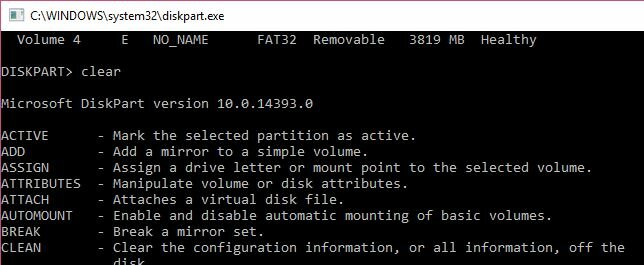
diskpart format
Diskpart command की help से Disk partition को कैसे format करते है –
- सबसे पहले आपको command prompt open करना है (open as Admin)
- Command prompt पर type करे – diskpart
- Volume को list करने के लिए, type करे – list volume
- जिस volume को format करना है उसको select करने के लिए, type करे – select volume n
- अब आपने format करने वाला volume select कर रखा है , format करने के लिए type करे – format fs=ntfs quick lable=hinditechy and press enter | यहाँ पर यह ध्यान रहे की हमने volume का नाम hinditechy दिया है, आप चाहे तो कुछ भी नाम रख सकते है |