Laptop computer and Mobile ka IP address kaise check pata kare
How to check computer IP address in cmd : दोस्तों हमने पहले भी IP address के बारे मे explain किया है| अगर आपने पहले वाले post miss कर दिए है एवं IP address के बारे मे जानना चाहते है तो What is IP Address पर click करे| आज हम आपको बता रहे है की Mobile, laptop, computer या किसी device का IP address कैसे चेक करते है|
IP address चेक करने से पहले हम आपको एक बात बताना चाहेंगे की किसी भी device मे IP address दो तरह से काम करता है – एक तो internet से कनेक्ट करने के लिए और दूसरा – लोकल एरिया network मे एक device को दूसरे device से connect करने के लिए| जो IP address इंटरनेट से कनेक्ट करने के लिए use किया जाता है उसको real IP address एवं जो लोकल network मे connect करने के लिए use किया जाता है उसको generally Private IP address कहते है| तो अब यहाँ पर questions ये उठता है की अगर एक device जो लोकल एरिया मे भी connected है एवं इंटरनेट से भी तो क्या उस device के पास दो IP address होंगे? तो answer है Yes| जैसे मान लेते है की अगर आप अपने घर पर BSNL broadband use करते हुए इंटरनेट से connect होते है तो आपका राऊटर आपकी devices को एक private IP address देता है जो की 192.168.1.1 से लेकर 192.168.1.254 तक कुछ भी हो सकता है| जबकि BSNL DHCP से उस राऊटर को भी एक unique IP एड्रेस देता है जिसकी help से router उस computer को internet से connect करता है| ये IP address real IP address होते है| अब आपको इस तरह के कंप्यूटर मे जो की दो IP एड्रेस के साथ काम कर रहा है, IP address check करना है तो आपको दोनों IP address windows की किसी भी कंप्यूटर या लैपटॉप मे एक command से ही पता लग जाएंगे| आइये देखते है कैसे –
कंप्यूटर या Laptop का प्राइवेट एंड पब्लिक IP address कैसे चेक करे –
Method 1 : How to check Public and Private IP address using command prompt command –
Step 1 – सबसे पहले आपको windows OS मे Start पर click करना है एंड run मे जाना है |

how to find my ip address using cmd
Step 2 – run पर आपको cmd type करना है जिससे command prompt की black window open हो जाएगी |
Step 3 – उस command prompt पर आपको एक command type करना है – ipconfig /all

how to find my ip address using cmd
यह command आपको उस computer का MAC address, private, Public IP address के साथ DNS एवं DHCP से related सभी information show कर देगा |
Method 2 : Computer, laptop ya mobile IP real or public IP address (जो की आपकी internet command आपको run time मे देती है ) कैसे पता करे : –
Step 1 – Open whatismyipaddress.com website in your mobile or computer browser.
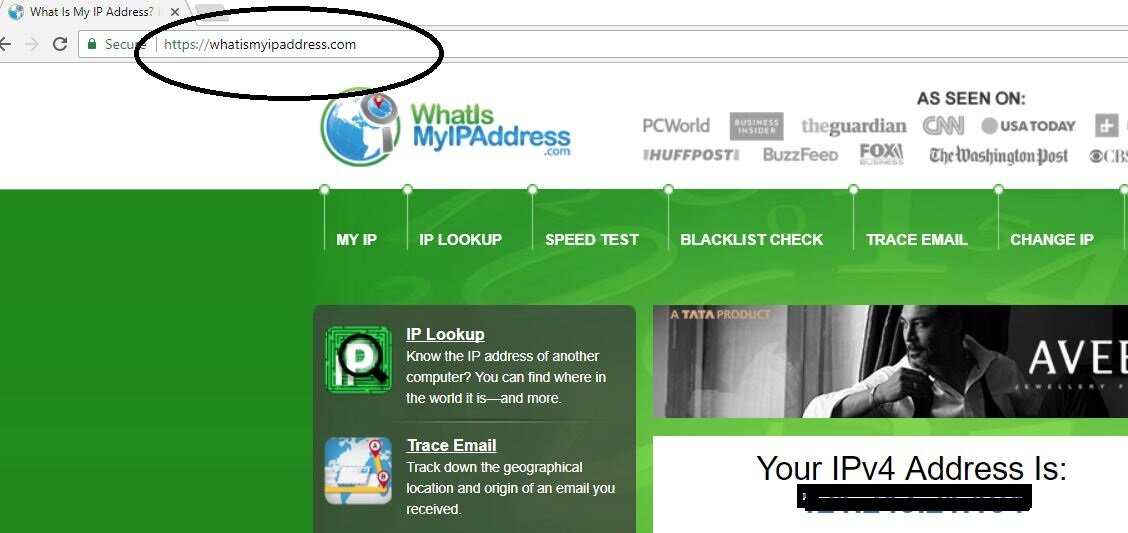
how to find my ip address using cmd
Step 2 – यह website open करते ही आपकी device का IP address show कर देगा |




I have bookmarked your homepage, it’s great and full of infos
Very helpful info