Idn Poker is a well-known digital poker platform in Asia, particularly in Indonesia. As a part of the official IDN Play network, this platform offers a variety of card games that can be played on both computers and mobile devices. Supported by modern technology and a stable server system, IDN Poker is the choice of many players seeking an poker online terbaik experience with easy and convenient access.

The popularity of IDNSLOT is inextricably linked to the rapid growth of the online gaming industry. Many users are currently seeking a platform that combines easy access, game variety, and high-quality service. The official idn slot online website offers a variety of these features in one place, meeting the ever-growing demand for digital entertainment.

Toto Macau is one of the most sought-after lottery markets by lottery enthusiasts because it provides regular data updates through its Macau Data, Macau Expenditures, Live Draw, and Macau 4D & 5D features. These various information services make it easy for users to monitor the latest result macau and view archives of previous results in one convenient location.

Configure BSNL Broadband Wifi modem router to enable Wi FI WLAN in Hindia

Configure BSNL Broadband Wifi modem router to enable WifI WLAN

 
Configure BSNL Broadband Wifi modem : BSNL WiFi को configure करने के लिए हमको सबसे पहले 192.168.1.1 मे login करना होगा then in the लेफ्ट साइड मे वायरलेस कनेक्शन को Click करना होगा | 
 
Step 1-  Type 192.168.1.1 then type username/password – admin/admin
 
Configure BSNL Broadband Wifi modem
Step 2 ( Below image) –  इसमे सबसे ऊपर वायरलेस नेटवर्क का ऑप्शन Disable आ रहा होगा – इसको enable करना है – 
 
Channel Selection – Choose Auto
Network Name (SSID) – आप अपने convenience  के हिसाब से या सिक्योरिटी के हिसाब से choose कर सकते है |  
Hide SSID – इसको अगर आप Yes करते है तो जब अपने कंप्यूटर के wireless नेटवर्क से इसको कनेक्ट करना चाहेंगे तो आपको आपका नेटवर्क का कोई नाम नहीं दिखेगा (जो आपने SSID मे दिया है) – आपको इस नेटवर्क से कनेक्ट करने के लिए SSID का नाम एंड पासवर्ड दोनों देने होंगे | यह बहुत secure है लकिन इसमे आपको हमेशा SSID याद रखना होगा  |
 
 
Configure BSNL Broadband Wifi modem


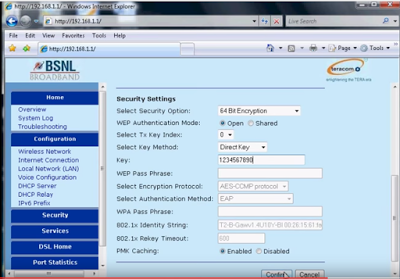
Step 3 – Security Settings – 
 
Select Security Option – Choose 64 bit Encryption
WeP Authentication Mode – Choose – Enable
Key Method – Direct 
Key – Give any ten digit number 
Click on Confirm in the last – 
 
 
Configure BSNL Broadband Wifi modem
 
 
इसमे आप Security settings option मे Mixed Mode भी सेलेक्ट कर सकते थे | अगर आप वो करते तो आपको WPA Pass phrase मे पासवर्ड सेट करना होता |

——————————————————————-

Click here to know how to setup BSNL Broandband Modem PPOE Settings in Bridge Mode

————————–


Total Views: 5 ,

Leave a Reply